


Summary Overview
Supplement storefront conversion optimization is the practice of helping qualified visitors move from initial interest to a confident purchase decision with less uncertainty and less friction. The work spans offer clarity, product education, compliant claims, trust signals, mobile usability, checkout design, speed, and disciplined measurement. A better storefront is not necessarily the one with the most sections. It is the one that answers the buyer's next question before that question becomes a reason to leave.
Diagnose the full decision path, from ad or search result through post-purchase confidence, rather than optimizing one page in isolation.
Use product clarity, evidence, trust, and transparent logistics to reduce uncertainty before the checkout step.
Treat mobile usability, checkout friction, and page performance as revenue-critical product work.
Run focused experiments with a clear hypothesis and a downstream quality metric, not only a click-through rate.
A high-converting supplement storefront makes the product, audience, evidence, price, delivery expectations, and next step easy to understand on every device. The most effective improvements remove a specific source of uncertainty or friction, then measure whether that change improves qualified progression through the whole purchase journey.
Why supplement storefronts lose qualified buyers
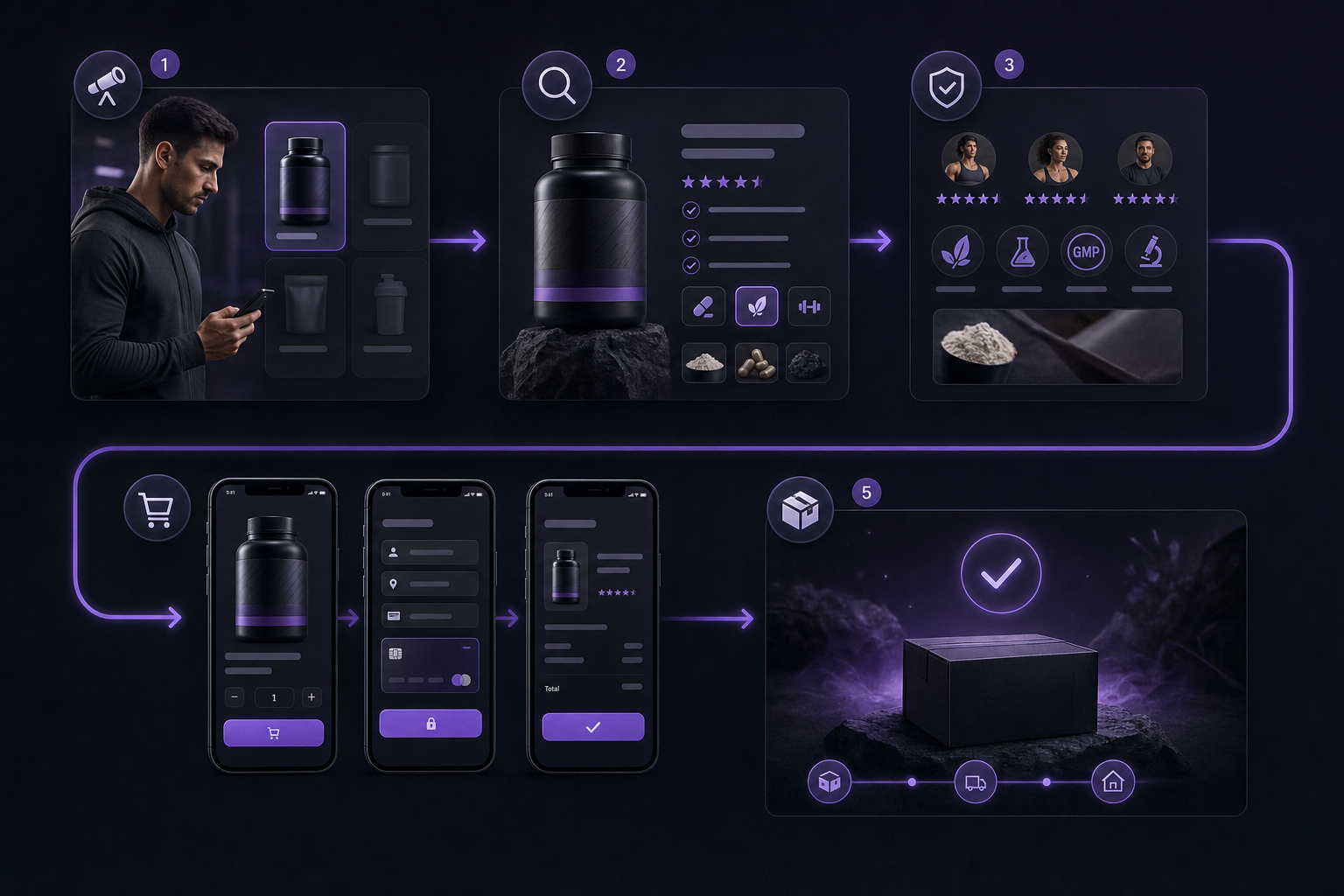
Illustrate the connected journey from arrival through product confidence, checkout, and post-purchase expectations.
Most supplement brands do not suffer from a traffic problem. They suffer from a confidence problem. You can acquire attention through ads, affiliates, search, creators, or email. Converting that attention into a purchase requires a connected sequence of decisions that feel safe, relevant, and timely. Treat the storefront as this decision path, not as a set of isolated templates. When qualified intent meets unclear offers, thin evidence, clumsy mobile layouts, or ambiguous checkout screens, motivated shoppers stall or leave.
A storefront is a decision path, not a brochure
Shoppers move through predictable stages: attention, understanding, comparison, trust, action, and post-purchase expectations. Each stage has a “next question” that, if left unanswered, becomes a reason to exit. In practice this means your product detail page must earn the next click to cart, your cart must earn the decision to continue, and your checkout must earn payment confidence. Conversions rise when each step anticipates the next question and removes the friction that would otherwise force the customer to think, re-evaluate, or hunt for reassurance.
The questions every shopper needs answered
For supplement ecommerce storefront success, organize your content and interactions around the questions that govern momentum:
Fit: Is this product for someone like me, given my goals and constraints?
Purpose: What is the intended use and what is a reasonable expectation for results over time?
Ingredients and details: What is in it, how much, how is it sourced or tested, and how do I take it?
Price and value: What do I pay today, what do I save in a bundle or subscription, and what is the real cost per day or per serving?
Delivery and returns: When will it arrive, how much is shipping, can I pause or cancel, and how do returns or refunds work?
Proof and trust: What evidence supports the product’s purpose, and how do you govern reviews and claims responsibly?
Safety and compliance context: What disclaimers, contraindications, or usage boundaries should I understand before buying?
When these answers are visible and credible at the moment of doubt, qualified buyers continue. When they are missing, buried, or inconsistent, even generous discounts and urgency tactics cannot compensate for the trust gap.
Build a product page that earns the next click
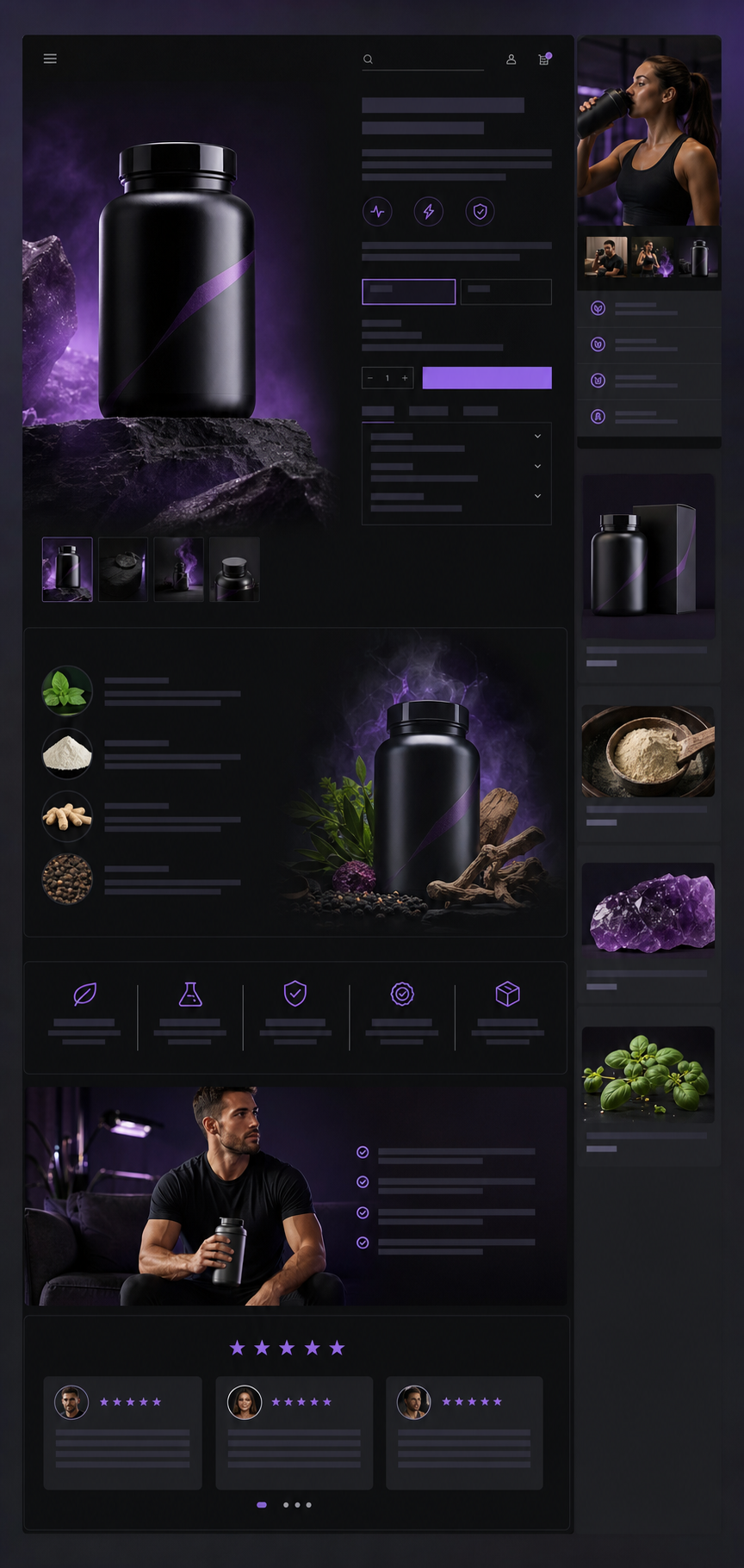
Show the visual hierarchy and trust-building elements of a helpful product page without copying a specific website interface.
Product pages are where intent becomes evaluation. Treat them as structured conversations. Your goal is not to overwhelm buyers with features. Your goal is to reduce uncertainty with clear propositions, transparent details, and honest evidence, then present an obvious next step. The result is stronger supplement product page conversion that moves qualified visitors forward without guesswork.
Make the first screen answer the right questions
Design the first viewport to do four jobs: confirm relevance, present the value proposition, show price context, and offer one primary action. Use a descriptive product name and a single-line benefit that is specific but responsible. Pair this with the key differentiator: dosage, form factor, or sourcing standard. Include price, available sizes, subscription savings, and a visible delivery estimate with location-aware language when possible. Anchor the screen with one obvious action: Add to cart or Choose my plan. Secondary actions like Save or Learn more can appear, but never compete with the primary path.
Headline: State the fit and purpose. Example: “Daily Omega-3 for focused professionals.”
Subhead: Clarify what is inside. Example: “1,000 mg EPA+DHA per serving, third-party purity tested.”
Price context: Present unit economics. Example: “$29, $0.97 per day, free shipping over $50.”
Action: One primary button with persistent visibility as the shopper scrolls.
Resist the temptation to stack badges and banners at the top. If everything is emphasized, nothing is clear. Prioritize what answers the buyer’s immediate question and move less critical assurances below the fold where they can be discovered mid-evaluation.
Use product education to reduce uncertainty
Organize details so that a curious reader can move from overview to depth without losing their place. For supplements, the core sections usually include:
What it is: A concise description with form factor, servings, and flavor or capsules.
Who it is for: Eligibility, lifestyle context, and who should not use it without professional guidance.
How it works: Ingredients, dosages, and what role each ingredient plays.
How to use: Timing, frequency, with or without food, and what to expect in the first week versus the first month.
Quality and testing: Sourcing, certifications, manufacturing controls, batch testing, and freshness handling.
Support: Contact options and response time. Make help visible before checkout.
A simple content pattern prevents cognitive overload: summary cards that preview each section, then progressive disclosure with accordions or tabs so mobile readers do not scroll endlessly. Keep eligibility, interactions, and disclaimers visible where the shopper decides between one-time purchase and subscription, since that is the moment a health-conscious buyer double checks fit.
Build trust without clutter
Trust is specific. Use credible proof and clear governance rather than decoration. If you reference studies, cite the paper and summarize the measured outcome in plain language without overstating causality. If you show reviews, state how they are collected, verified, and moderated. Make logistics concrete: delivery dates, packaging that protects heat-sensitive products, and what happens if a shipment is delayed. Link to return and refund terms from the cart and checkout review so shoppers are not forced to leave the flow to check policy language.
Claims boundaries: Do not promise outcomes that require medical substantiation. Use responsible phrasing like “supports,” “helps maintain,” and “intended for.”
Evidence hierarchy: Product facts first, third-party certifications second, then curated customer proof with governance language.
Policy structure: Plain-language summaries with a link to full terms. Avoid fine-print surprises at checkout.
Design the mobile and checkout experience for completion

Help readers visualize a friction-reducing mobile purchase experience.
Most evaluation now happens on phones, so mobile ecommerce user experience is central to supplement storefront conversion optimization. Mobile layouts must preserve context, not hide it. Checkout must feel transparent, forgiving, and safe. Treat these as product requirements, not optional polish.
Mobile design should preserve decision context
Design for content parity between desktop and mobile so critical product facts, images, and policies are present and consistent on small screens. Google’s mobile-first indexing guidance reinforces that your mobile experience should include the same meaningful content, structured data, and metadata that you consider essential for discovery and evaluation. Content that exists only on desktop can be missed or misinterpreted during indexing, and your shoppers will miss it at the moment they need reassurance. Ensure tap targets are large, text is legible, and sticky actions never obscure important information or policy links. (Google mobile-first indexing guidance)
Use images and short videos as functional aids, not as decoration. Show capsule size next to a coin, show a scoop in the jar, or show the supplement facts panel in a zoomable image. Provide a clear table of contents near the top for fast jumps to Ingredients, How to Use, and Delivery. The goal is simple: no mobile visitor should need multiple back-and-forth scrolls to collect the evidence they need to advance.
Remove checkout ambiguity
Checkout usability determines whether intent becomes revenue. Years of Baymard Institute testing show that clear labels, inline validation, logical field grouping, and transparent order details reduce errors and increase completion. Apply these principles with your audience and payment stack in mind, and test changes against quality metrics rather than assumptions about a single perfect pattern. (Baymard checkout usability research)
Form clarity: Use explicit labels, not placeholders. Keep optional fields truly optional. Group address inputs logically.
Error handling: Validate inline, in context, with actionable copy that explains what to fix. Avoid clearing the entire form after an error.
Payment confidence: Support familiar payment methods for your buyers, show security cues responsibly, and match button labels to the next action. If redirecting to a wallet, say so on the button.
Order transparency: Keep a live order summary with item, quantity, price, shipping, taxes, delivery estimate, and total. Let shoppers edit without losing progress.
Guest first: Offer guest checkout first, then invite account creation after purchase. Do not lock account creation behind a password requirement in the first step.
Baymard’s public research highlights patterns that repeatedly cause friction: hidden costs revealed late, overly aggressive address validation, required phone numbers without clear rationale, and progress indicators that do not match the actual steps. Use their insights as a benchmark and then validate with your own shoppers in your own flow. (Baymard checkout UX research)
Recover when a shopper hesitates
Not every hesitation is abandonment. Design for recovery. Save cart and checkout states so a returning visitor lands exactly where they stopped, with form values persisted and errors cleared. Offer visible support: live chat that opens with a short list of common checkout issues, a callback option, and a link to shipping policies. Use remarketing with care. If you email an abandoned cart, include a clear summary of items, price, delivery estimate, and support contact, not only a coupon. After purchase, send a confirmation that explains what to expect, how to track, and how to get help if the package shows heat exposure or damage. These touches reduce refund risk and increase the probability of a second order.
A smarter commerce system
Turn a better plan into real momentum.
DigiShop gives serious sellers a connected foundation for storefronts, acquisition, compliance, and performance so strategy can compound in the work.
Request early accessImprove speed and measurement before guessing
Speed and measurement are the multipliers behind every tactic. Faster, more stable pages reduce friction throughout the path, and disciplined measurement keeps your team focused on the changes that matter. Treat performance and analytics as first-class product features.
Measure the experience shoppers actually receive
Use PageSpeed Insights to view Core Web Vitals from real users alongside lab diagnostics. Focus on user-centric metrics: Largest Contentful Paint for loading, Cumulative Layout Shift for visual stability, and Interaction to Next Paint for responsiveness. Field data reveals the distribution your buyers actually experience, not a single lab score on a perfect connection. Debug regressions by device type and network conditions, then correlate improvements with funnel progression, not just with a higher tool score. (web.dev Core Web Vitals guidance)
When you review performance, start with the pages and segments that move revenue: top landing pages for paid search, high-intent organic entries like ingredient or brand terms, and returning mobile visitors who are comparing options. Measure before and after at each funnel step: product views to adds, adds to checkout starts, checkout starts to successful payments. Segment by device, source, campaign, landing page, geography, and new versus returning so you can detect where a change helps one cohort while hurting another. Then prioritize fixes that improve the experience for the cohorts that drive profit, not only raw conversion rate.
Define a conversion experiment before changing the page
Experimentation is not a roulette wheel. It is a method for proving that a change removes friction for qualified buyers without causing collateral damage. Use a simple template to force discipline:
Hypothesis: If we make X change for Y audience on Z surface, then qualified progression from step A to B will improve, because it answers Q at the moment of hesitation.
Primary metric: Choose a step change that maps to intent quality, not raw clicks. Examples: product to checkout start for mobile search visitors, checkout start to completion for returning subscribers who switch flavors.
Guardrail metrics: Track refund rate, support tickets per order, subscription churn in the first 60 days, and average order margin, so you do not trade long-term value for a short-term uptick.
Sample discipline: Estimate the traffic needed to detect a practical effect. If you do not have volume, run a sequential test over time with holdout logic, or combine qualitative usability sessions with smaller in-market tests.
Decision rule: Set criteria before launch. If the primary metric lifts without harming guardrails, ship; if it is flat but error rates fall, consider shipping with a follow-up; if guardrails worsen, revert and investigate.
Write the hypothesis where the team makes the change. Include who owns the rollout, how long the measurement window lasts, and what will be learned even if the result is neutral. This habit separates meaningful ecommerce checkout optimization from guesswork.
A 90-day supplement storefront improvement plan
Use this plan to translate strategy into coordinated execution. Sequence work so early wins remove the largest uncertainty while setting you up for sustainable gains.
Prioritize fixes by evidence and effort
Days 1 to 30: Establish truth and remove obvious blockers
Instrument the funnel: Verify that you are capturing product views, add to carts, checkout starts, payment attempts, errors by field, and successful orders. Break out by device and source.
Performance triage: Audit Core Web Vitals on top entry and product pages. Compress and lazy load media, preconnect to critical origins, and defer nonessential scripts. Document current LCP element by template so you can track changes against a concrete target. (web.dev Core Web Vitals guidance)
Mobile parity sweep: Confirm that mobile and desktop versions expose the same essential product facts, structured data, and policy summaries. Fix missing or hidden sections that affect evaluation. (Google mobile-first indexing guidance)
First-screen clarity: Rewrite top-of-page copy to state audience, purpose, and key differentiator in one screen, with price context and one primary action.
Policy visibility: Add plain-language summaries for shipping, returns, and subscriptions on product pages, cart, and the checkout review step.
Checkout errors: Review the last 30 days of failed payments and form errors. Fix vague messages, required but unexplained fields, and progress indicators that do not match the real steps. Use inline validation and keep user input on error. (Baymard checkout usability research)
Days 31 to 60: Strengthen product education and checkout confidence
Ingredient education: Add an ingredient table with function, dosage, and source for each component. Link from each ingredient mention to this anchor so mobile readers can jump without losing context.
Eligibility clarity: Create a short “Who this is for” section near the purchase options to reduce uncertainty for health-conscious buyers.
Image utility: Replace decorative images with functional visuals that show capsule size, scoop size, and the supplement facts panel.
Order transparency: Implement a live, collapsible order summary in checkout with taxes, shipping, delivery date estimate, and an edit path that does not restart the flow. (Baymard checkout UX research)
Support access: Add chat and callback options in cart and checkout, with prefilled topics like Payment trouble, Address issues, and Delivery questions.
Save states: Persist cart contents and partially completed checkout fields for returning visitors, respecting privacy preferences.
Days 61 to 90: Experiment and institutionalize governance
Hypothesis-driven tests: Run two to three focused tests, each tied to a friction point found in analytics or support logs. Example: moving subscription copy and the pause policy near the purchase button for mobile visitors who previously bounced at checkout start.
Guardrail review: Monitor refund and ticket rates to ensure that conversion lifts represent healthier decisions, not preventable confusion.
Claims and content governance: Create a checklist for new product or label changes that triggers storefront updates: ingredient table, images, FAQs, and policy summaries.
Performance budgets: Set page weight and third-party script budgets by template. Review them as part of code review so speed stays within targets. (web.dev Core Web Vitals guidance)
Documentation: Capture what worked, what did not, and what you learned about your audience’s most persistent questions. Feed these into future tests and creative briefs.
Checkout fixes last longer when they fit the rest of the stack. A platform evaluation framework helps teams assess that broader operating fit.
Frequently Asked Questions
What makes a supplement storefront convert better?
High performers reduce uncertainty at the exact moment it appears. They clarify the offer, show who the product is for, present transparent price and delivery expectations, and offer one obvious next step. They educate without hype, maintain content parity on mobile, keep checkout fields clear with inline validation, and measure improvements by qualified progression through the funnel rather than by surface-level engagement. For checkout specifics and benchmarking context, review Baymard Institute’s public research as a compass, then validate in your own flow. (Baymard checkout usability research)
Which storefront element should a supplement seller test first?
Start where hesitation is highest and impact is largest. For many brands that is the first screen of the product page on mobile: clarify audience, purpose, key differentiator, price context, and a single primary action. If analytics show strong add-to-cart but weak checkout starts, test cart transparency and the entry to checkout instead. Use a tight hypothesis with a downstream metric like checkout start rate or completion rate for mobile search visitors.
How does checkout usability affect conversion?
Checkout usability turns intent into revenue by removing ambiguity and error risk. Clear labels and field groupings reduce cognitive load, inline validation prevents costly mistakes, transparent totals build trust, and a visible edit path eliminates fear of getting stuck. Independent usability research at Baymard documents how small friction points compound into abandonment, which is why applying research-backed patterns is a fast way to improve completion. Validate changes in your own data and do not assume one pattern wins for every audience. (Baymard checkout UX research)
Closing perspective
Supplement storefront conversion optimization is not a trick. It is the craft of removing uncertainty with timely clarity, responsible evidence, and kind usability. When teams align content, design, engineering, and operations around the shopper’s next question, conversion improves as a byproduct of better decisions. That is good for revenue and good for customers.