


DigiShop and the Digistore24 MCP server work together by pairing an AI-native ecommerce operating layer with live, permissioned Digistore24 context.
DigiShop supports the storefront, conversion, compliance, affiliate, and content side of the business, while a compatible AI client can use MCP to retrieve approved account data and perform deliberate Digistore24 actions through separate read and write permissions.
DigiShop and Digistore24 MCP address customer-facing commerce and live back-office intelligence as complementary layers.
The strongest early MCP use cases are reporting, launch preparation, product operations, campaign checks, and affiliate performance reviews.
Separate read and write credentials, confirmation gates, action logs, and post-action verification make AI-assisted work more governable.
The commercial value comes from shortening the cycle between live data, decisions, execution, and measurement.
If you want the speed of AI without ceding control of your store, connect a conversion-focused DigiShop experience with the Digistore24 MCP server. You get a governed path from live account context to deliberate action, so teams move faster while approvals, logs, and permission boundaries stay intact.
What an AI ecommerce platform should actually connect
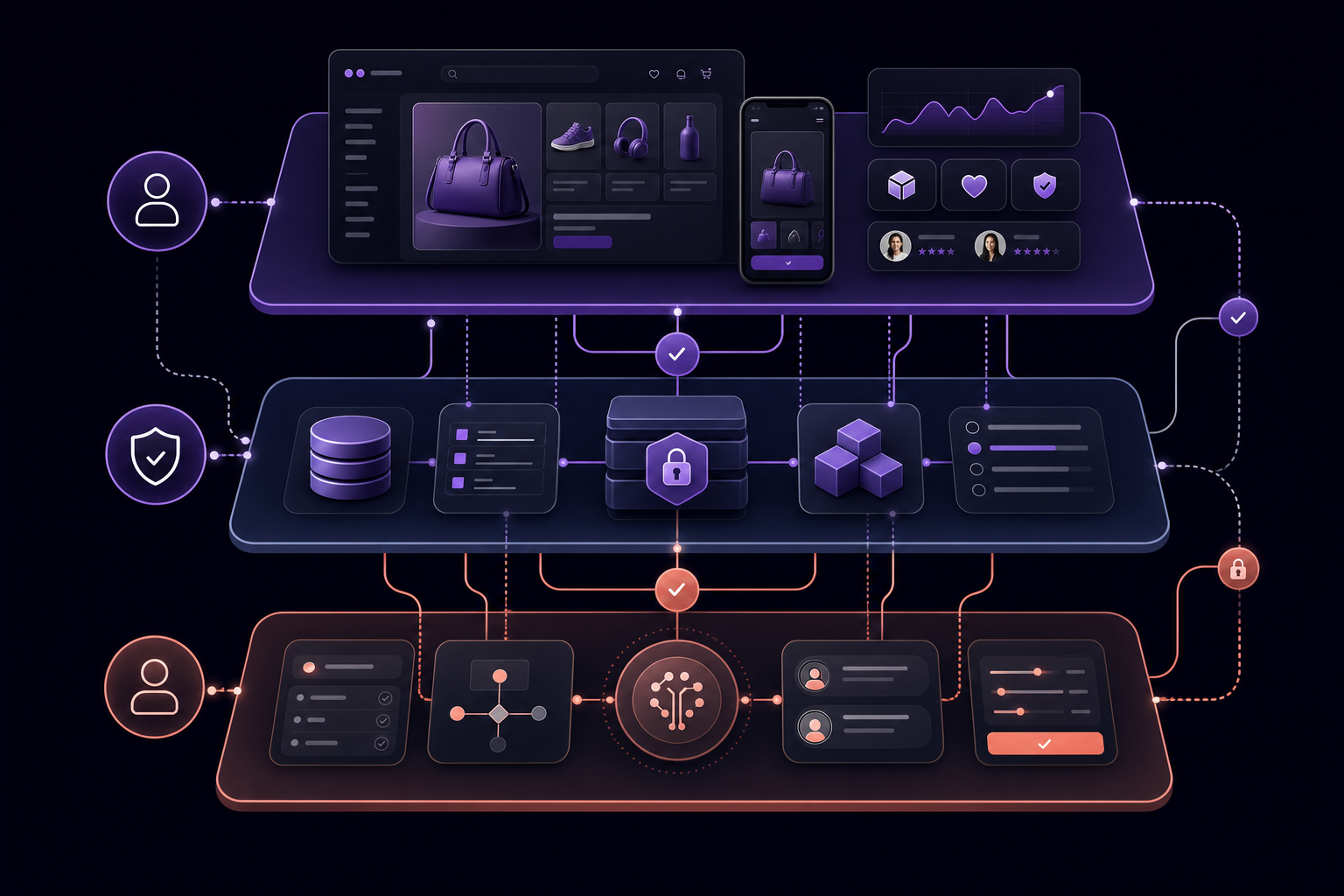
Explain how the customer experience, commerce system of record, and agent-control layer work together without presenting AI as an uncontrolled actor.
An effective AI ecommerce platform is not another chatbot widget. It is a connected operating layer that unifies three things: the customer experience where conversion happens, the commerce system of record where products, payments, orders, and affiliates live, and a governed agent layer that can read context and perform only the actions you approve. When these three parts work together, you shrink the gap between insight and execution without losing oversight.
Model Context Protocol, often shortened to MCP, is the open specification many AI clients use to discover tools, read approved context, and request actions through a purpose-built server. The official materials emphasize least-privilege access, targeted elevation, confirmations, and auditable activity, which align well with ecommerce governance needs. See the protocol’s MCP security best practices for the core principles that keep agents inside safe boundaries.
AI tools are not the same as an AI operating model
Most teams already use generative AI for one-off drafting or analysis. That helps, but it is separate from an operating model where an approved agent works from live, permissioned business context. The difference is accountability. A standalone prompt has no concept of your product catalog, payment plans, or refunds, and it cannot act. An MCP-connected agent can fetch current product and order data or propose changes, but only within the access you grant. Not every agent needs account access. Start with read-only reporting, then selectively enable write actions for a narrow, reviewed workflow.
The three layers of an AI-native commerce operation
Use this map to separate concerns so you can speed up safely:
Three-layer operating model for an AI ecommerce platform
Layer Primary purpose Typical systems Good questions Risks if conflated Default permission Experience layer Shape the storefront and conversion messages; ensure compliant, high-clarity UX DigiShop for storefront, content, on-site workflows What should this offer promise, and how do we present it clearly Inconsistent claims, unclear pricing, broken flows N/A to MCP; human editorial control System of record Maintain authoritative products, prices, orders, subscriptions, and affiliates Digistore24 account and APIs What are sales by product this week; which plan terms apply Stale data, misapplied discounts, attribution errors Read-only by default for agents Agent-control layer Enable governed AI access to read context and request approved actions Digistore24 MCP server with compatible AI clients Show recent purchases for product X; create a time-bound discount code Unauthorized changes if permissions and confirmations are not enforced Separate read and write keys, confirmations, and logs
What DigiShop contributes to the operating layer
DigiShop is the experience and operating layer that faces your customers and guides their decisions. It is where you present offers with clarity, earn trust with compliant claims, coordinate affiliates, and keep conversion paths obvious. That foundation matters even more when back-office actions speed up, because faster does not help if the messaging is off or the page flow is confusing.
A conversion-ready storefront and commerce experience
Use DigiShop to manage the storefront, product presentation, checkout clarity, upsell logic, and customer reassurance. Your job is to reduce hesitation. That means clear titles and benefits, reliable pricing displays, mobile-first layouts, and friction-aware microcopy. When an MCP-enabled agent later suggests a small offer change or flags a trend in refunds, DigiShop gives you the surface to respond quickly without breaking the experience.
Compliance-aware publishing and content operations
Governed content is not optional. Even if an agent drafts language or flags gaps, your editorial review and policy checks still gate what goes live. Treat DigiShop as the place where product claims, disclaimers, and partner terms stay consistent. Agents can help prepare alternatives and point to current constraints, but the final say remains human because context, risk, and brand fit vary by business.
Affiliate and growth workflows need current operational context
Affiliate programs move faster when messaging reflects current performance and availability. With read access through MCP, a compatible AI client can retrieve sales by product or campaign, then help your team refresh landing page copy or prioritize creative requests in DigiShop. Keep claims and attribution under review, and use human checkpoints for contractual updates and payouts.
What the Digistore24 MCP server lets an agent do
The Digistore24 MCP server exposes permissioned access so an AI client can retrieve account context and, when you allow it, perform specific actions. Digistore24 describes this as natural-language operations with permission controls and audit visibility. See the official MCP integration overview for how access is governed and logged.
Ask questions against live account context
With read access, a compatible AI client can request current data that would otherwise require dashboard navigation. Typical examples include recent purchases for a product, open orders with a billing status, product definitions and plan terms, and sales or refunds by period. These are retrieval tasks, so read access is sufficient. Digistore24’s MCP setup documentation shows how the server is configured and how clients discover read-capable tools.
Prepare and execute controlled changes
When your team is ready for deliberate changes, enable a separate full-access key. Documented examples include creating or duplicating a product, adjusting a payment plan, and creating a time-bound discount code. These steps require explicit confirmation before the agent proceeds. Digistore24’s guidance distinguishes retrieval from account changes and recommends different keys for each. See the API key permissions guide for the difference between read access and full access, and review the Digistore24 MCP launch article for examples that involve products, orders, campaigns, and reports.
Work inside the AI client your team already uses
Digistore24’s documentation lists client examples that can connect to MCP, including Claude Desktop, Cursor, and Windsurf. If your team already uses one of these, you can keep the workflow familiar while introducing account-aware operations. Confirm support in the official Digistore24 MCP setup notes, and treat any other client as unverified until documentation or testing confirms compatibility.
High-leverage DigiShop and Digistore24 MCP workflows

Make the documented workflow tangible: review, live data query, human approval, deliberate action, and verification.
The power comes from pairing DigiShop’s customer-facing surfaces with live Digistore24 context and deliberate, confirmed changes. Keep each workflow structured: review intent, retrieve data, decide and approve, act with the right permission, then verify and log.
Launch readiness from storefront to offer configuration
Review the storefront intent in DigiShop: positioning, benefits, pricing display, and any regulatory notes.
Ask the AI client, through MCP read access, to retrieve current Digistore24 product details: SKU, plan terms, tax settings, and existing discount codes.
Resolve mismatches. If a plan term or price has changed, decide whether the storefront should adapt or the product should be updated.
For a small, deliberate change, temporarily enable the write connection. Confirm the affected product, the exact fields, and the scope of change in the confirmation dialog.
Verify the result: query the account again with read access, update DigiShop copy where needed, and log the action and reviewer.
Affiliate activation informed by current performance
Use MCP read access to pull recent sales by product and by affiliate segment. Focus on which offers convert from cold traffic versus warm lists.
Draft refreshed DigiShop landing copy and creative briefs that fit the winning angles. Keep claims within policy and maintain a human review for attribution language.
Prepare a prioritized outreach list for creators or affiliates, along with on-brand snippets and approved assets.
After launch, query sales by period to confirm the change in direction. Capture notes about what moved and what stalled.
Faster reporting without dashboard scavenger hunts
Ask for transactions or sales by product and date range with MCP read access.
Compare patterns to recent DigiShop changes: headline shifts, pricing tests, or content updates.
Produce a three-item action list with owners and due dates. Focus on the next best change, not a sprawling backlog.
Re-run the report after changes to confirm movement, then archive the action log for accountability.
Discount and offer operations with a deliberate write gate
Draft the promotion intent in DigiShop: qualifying products, discount amount or price override, and exact start and end dates.
Use read access to confirm there is no conflicting active code.
Enable the write connection for this task only. Create the code with explicit confirmation that lists product IDs, discount value, currency, and time window.
Validate by querying the code details with read access, test an on-site preview in DigiShop, then disable write access and document what changed.
Start a controlled pilot
Nominate a small cross-functional group, begin with read-only reporting, and select one low-risk write action to test under confirmation. Decide the standing model after you verify the results and review the logs.
Commerce, reconnected
Bring your storefront closer to launch.
DigiShop unifies your storefront, checkout, analytics, and growth operations so your next commerce experience can move from idea to live faster.
Request early accessSafe MCP setup: a practical governance model
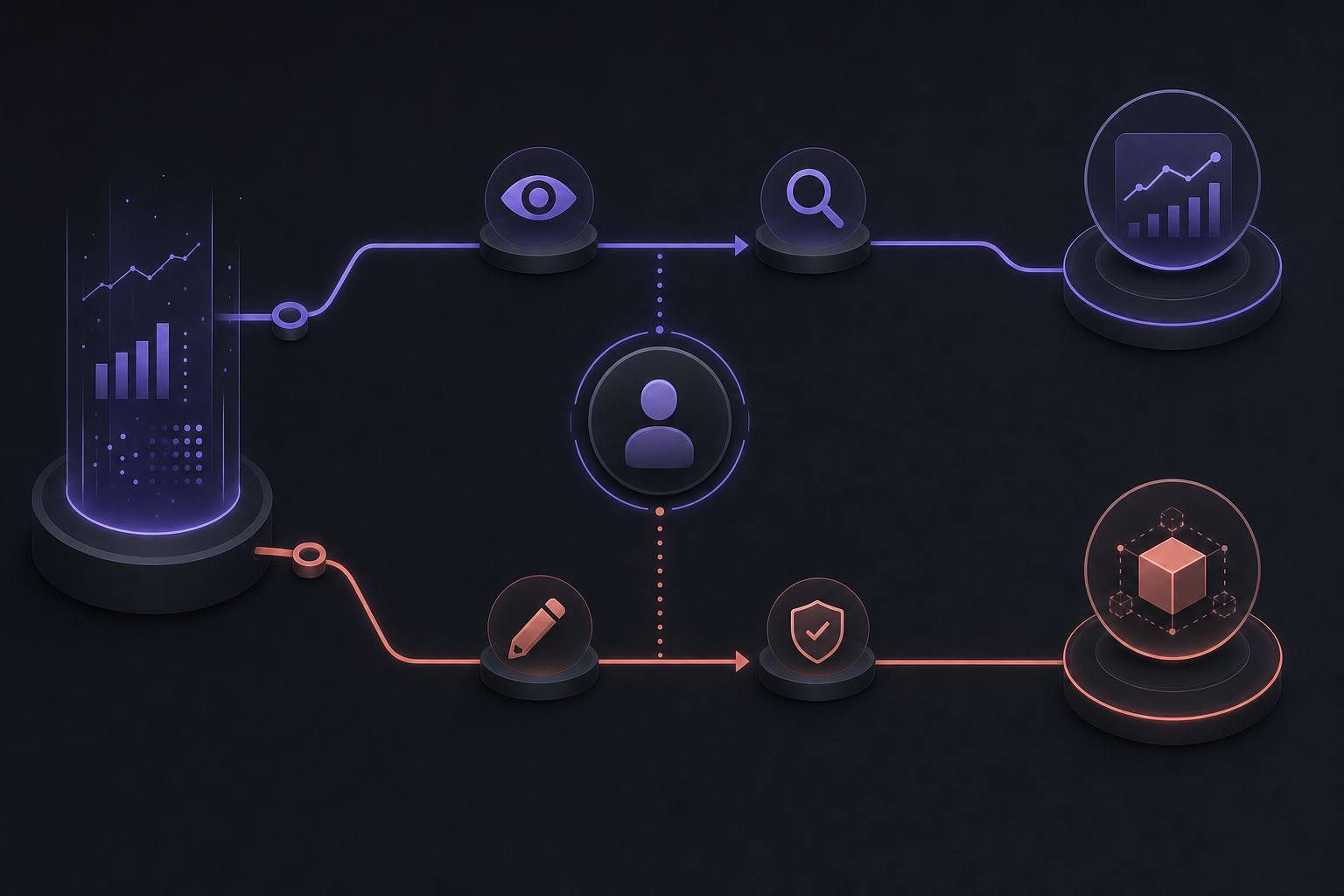
Visually reinforce the intentional separation between low-risk query access and high-risk change access.
Speed and control can coexist. Adopt a permission pattern that treats reading data as the default and writing changes as an exception you enable for a specific, reviewed purpose. Keep confirmations, logs, and key hygiene nonnegotiable.
Start with read-only discovery
Begin with retrieval. Create an approved read key in Digistore24, configure the MCP server, restart or reconnect your AI client, and verify with a simple query such as sales by product for the last seven days. The official Digistore24 MCP setup documentation walks through server configuration, client discovery, and confirmation practices at a high level.
Use a separate write connection only when needed
Keep read and write credentials separate. Many teams label them digistore24-read and digistore24-write, then enable write only for a defined task with a clear owner and a time limit. The API key permissions guide explains the difference between retrieval access and full access that allows account changes, and the MCP integration overview reinforces permission-controlled, audit-logged operations.
Preserve confirmation, auditability, and key hygiene
Do not skip the safety plumbing: require confirmation dialogs that restate the exact change, keep action logs with who approved and when, store secrets securely, and rotate keys on a schedule or after role changes. These practices align with the protocol’s least-privilege and audit guidance, and with Digistore24’s privacy and logging notes in its MCP integration page.
How to evaluate the business case
Buyers ask for ROI figures, but responsible teams start with observable operations. Measure the time it takes to retrieve reports, to prepare a launch, and to move from decision to verified change. Track how many manual handoffs you eliminate, how often work stalls due to stale data, and how many changes you roll back after validation fails. Those trendlines show real value without speculative promises.
Measure cycle time, error prevention, and action quality
Cycle time: minutes from a reporting question to a usable answer that includes links or identifiers.
Error prevention: fewer mismatches between DigiShop copy and Digistore24 plan terms after a structured review.
Action quality: clearer confirmations, fewer partial changes, and faster verification because the agent returns the exact objects it changed.
Team bandwidth: reduction in context-hunting time, which frees specialists to do higher-value work.
Select use cases by risk and reversibility
Workflow selection by business value, risk, and permission level
Workflow Primary value Operational risk Recommended permission Verification step Sales and refund reporting Faster decisions from current data Low Read-only Cross-check totals for a second period or product Launch preparation checklist Align storefront claims with plan terms Low to medium Read-only Human signoff that copy matches definitions Discount code creation Faster promotion setup Medium Write, time-bound and confirmed Agent re-queries code details after creation Product duplication for testing Safely trial a new configuration Medium Write, scoped to one product Human review of changes before listing Payment-plan adjustment Improve fit to buyer segments Higher Write, explicit approvals and rollback plan Confirm plan ID, terms, and dates twice
If you need broader strategic framing for agent-ready systems, see this agentic commerce analysis by McKinsey which emphasizes secure APIs, identity, and governance as prerequisites for value.
A 30-day adoption sequence

Support a staged adoption mindset instead of a risky all-at-once automation promise.
Move from interest to results in four weeks without risking core operations. Treat week one as discovery, weeks two and three as standardization, and week four as a supervised write test.
Days 1-7: map decisions and connect a read-only agent
List the recurring questions that slow your team: sales by product or affiliate, refunds by reason, open orders needing attention, and launch readiness checks.
Create a read-only API key and configure the Digistore24 MCP server. Restart your AI client and verify with a simple sales-by-period query.
Identify the people who will request data and who will interpret it. Keep the group small for now.
Days 8-21: build approved operating prompts and review loops
Document prompts for common reporting, product quality assurance, offer alignment, and affiliate performance reviews. Include clear intent, example outputs, and what to do if the data looks off.
Define human review gates for claims, pricing displays, and affiliate messages in DigiShop. Do not publish without a second set of eyes.
Establish a daily rhythm: morning retrieval for yesterday’s KPIs, midweek trend check, and a Friday summary with three focused actions.
Days 22-30: introduce one controlled write workflow
Create a separate full-access key labeled for the pilot. Set a time box and an owner.
Choose a low-risk change such as creating a time-bound discount code. Require a confirmation dialog that lists the exact products, discount, and dates.
Validate by querying the new object with read access, test it on a DigiShop preview, and then disable the write key.
Log the steps, the outcome, and lessons learned. Decide the permanent model for write access, including when to elevate and how to rotate keys.
Frequently Asked Questions
What is an AI ecommerce platform?
It is a connected operating model that pairs your storefront experience with the system of record and a governed agent layer. The platform does not just generate copy. It ties live context to deliberate actions with permissions, confirmations, and logs so teams move faster without losing control.
What is the Digistore24 MCP server?
It is a server that implements Model Context Protocol for Digistore24. A compatible AI client connects to it to discover read and write tools that map to your account. Access is permission-controlled and audit-friendly. Start with the official MCP integration overview and the detailed MCP setup documentation.
Can Digistore24 MCP read sales and order data?
Yes, when you grant read access. A compatible AI client can retrieve current objects such as products, orders, and sales reports for approved queries. Changes to account data require full-access permissions, explicit confirmations, and verification. See the API key permissions guide for how read and full access differ, and review MCP security best practices for least-privilege and audit guidance.